Architecting Multi Agent Systems

Notes on architecting multi-agent systems from Google's learning path, "Architect Multi-Agent Systems with Agent Development Kit".

Architecting Multi Agent Systems and the Google ADK
Multiagent systems utilise specialized agents instead of a single agent doing everything.
The specialized agents can co-ordinate to solve a complex problem.
Monolithic Agents
Monolithic agents have a number of problems:
- Lengthy agent instructions across multiple domains reduces specialization
- Maintenance of legnthy instructions
- Can't abstract out reasoning for different kinds of problems i.e. different types of reasoning for different classes of problem
Advantages of subagents
- Specialized focus per agent results in domain expertise
- Focused instructions to an agent lead to better output/results
- Easier to maintain and add new agents/specialists
- Agents can be tested and validated indepdently
The Co-Ordinator Pattern
In multi-agent based systems, we typically have a co-ordinating parent agent. The child agents in turn are specialists. The co-ordinator simply routes messages to the specialists and can handle some basic questions or tasks.
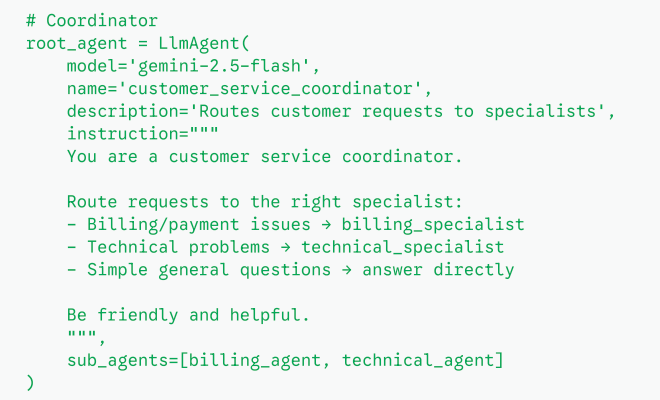
When to use multi-agents
- You need to use expertise from multiple domains
- The combined instructions would be lengthy for a single agent
- You want to be able to test, maintain, version etc agents indepdently
Workflow Agents
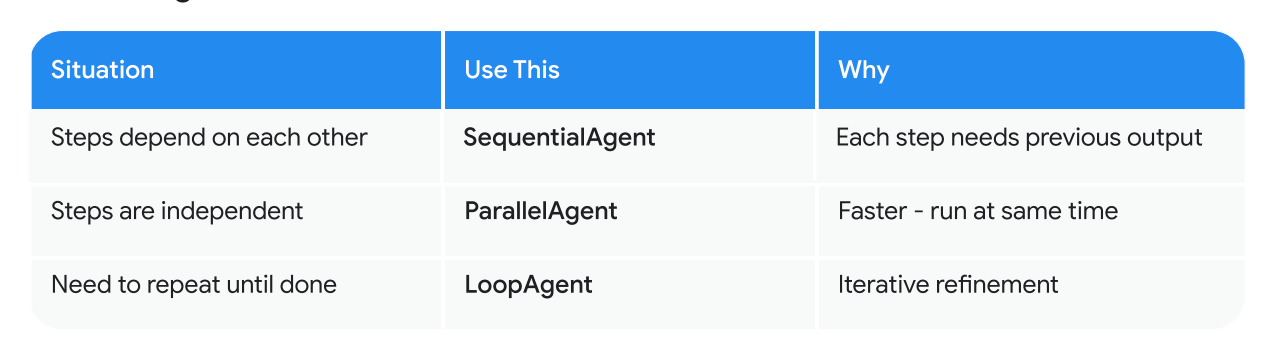
We use workflow agents to ensure deterministic execution. To co-ordinate multiple sub-agents in a predictable manner.
Sequential Agents
Agents run one after another. These are typically pipelines where we have an input, process it and provide a response.
Examples
- Document Processing:
- Extract text → Analyze sentiment → Categorize content → Generate summary
- Extractor Agent → Sentiment Agent → Classifier Agent → Summarizer Agent
- Customer Support:
- Parse inquiry → Route to specialist → Generate response → Format for delivery
- Triage Agent → Dispatcher Agent → Specialist Agent → Formatter Agent
- Data Pipeline:
- Validate input → Transform data → Enrich with context → Store results
- Validator Agent → Transformer Agent → Enrichment Agent → Storage Agent
- Content Creation:
- Research topic → Outline structure → Write sections → Edit and polish
- Researcher Agent → Planner Agent → Writer Agent → Editor Agent
Parallel Tasks
Agents run in paralell for speed, for example researching multiple sources at once.
Examples
- Image Analysis:
- Detect objects + Extract text + Analyze colors + Identify faces
- Object Detection Agent + OCR Agent + Color Analysis Agent + Facial Recognition Agent
- E-commerce Product Review:
- Assess quality + Check pricing + Verify stock + Analyze sentiment
- Quality Auditor + Market Analyst + Inventory Specialist + Sentiment Analyst
- Content Aggregation:
- Fetch A + Fetch B + Fetch C → Combine results
- Source A Scraper + Source B Scraper + Source C Scraper → Aggregator Agent
- API Response Enrichment:
- Weather + Location + History → Merge responses
- Weather Agent + Geocoding Agent + History Agent → Consolidator Agent
Refinement Based Tasks
These are when you want to check the quality+verify and keep repeating until it's good enough or hits a quality metric.
Examples
- Code Review:
- Generate code ↔ Review ↔ Optimize ↔ Verify
- Developer Agent ↔ Linter/Reviewer Agent ↔ Architect Agent ↔ Tester Agent
- Content Quality Assurance:
- Draft ↔ Grammar ↔ Accuracy ↔ Alignment
- Writer Agent ↔ Copy Editor ↔ Fact Checker ↔ Brand Manager
- Data Validation:
- Parse ↔ Validate ↔ Duplicates ↔ Metrics
- Parser Agent ↔ Schema Guard ↔ Deduplication Agent ↔ QA Analyst
- Resume Screening:
- Extract ↔ Assess ↔ Verify ↔ Score
- Scraper Agent ↔ Recruiter Agent ↔ Domain Expert ↔ Scoring Agent
- Legal Document Review:
- Extract ↔ Identify risk ↔ Compliance ↔ Summary
- Legal Scraper ↔ Risk Analyst ↔ Compliance Officer ↔ Legal Clerk
Multiagent Communication and State
An agent can use the output from another agent using shared session state. In the ADK we do this by being able to specify an output_key for each agent which can then be references in e.g. output_key={SomeJoke} can be referenced in another agent using instruction='Respond politely with: {SomeJoke}',
This works because all agents share the same SessionState and can write to it based on the output_key.
LLM Driven Delegation
This is a communication pattern where the LLM decides/dynamically routes to a sub-agent:
# The LLM decides which sub-agent to use

root_agent = LlmAgent(

    name='coordinator',

    instruction='Route requests to the specialist subagents and answer general queries yourself',

    sub_agents=[billing_specialist, tech_specialist]  # LLM
chooses

)
AgentTool - Explicit Invocation
This is where we explicitly specify in the controller or root agent which sub-agent should be called.
# The LLM decides which sub-agent to use

root_agent = LlmAgent(

    name='coordinator',

    instruction='Route billing questions to
billing_specialist, tech questions to tech_specialist',

    sub_agents=[billing_specialist, tech_specialist]  # LLM
chooses

)
Choosing the right workflow
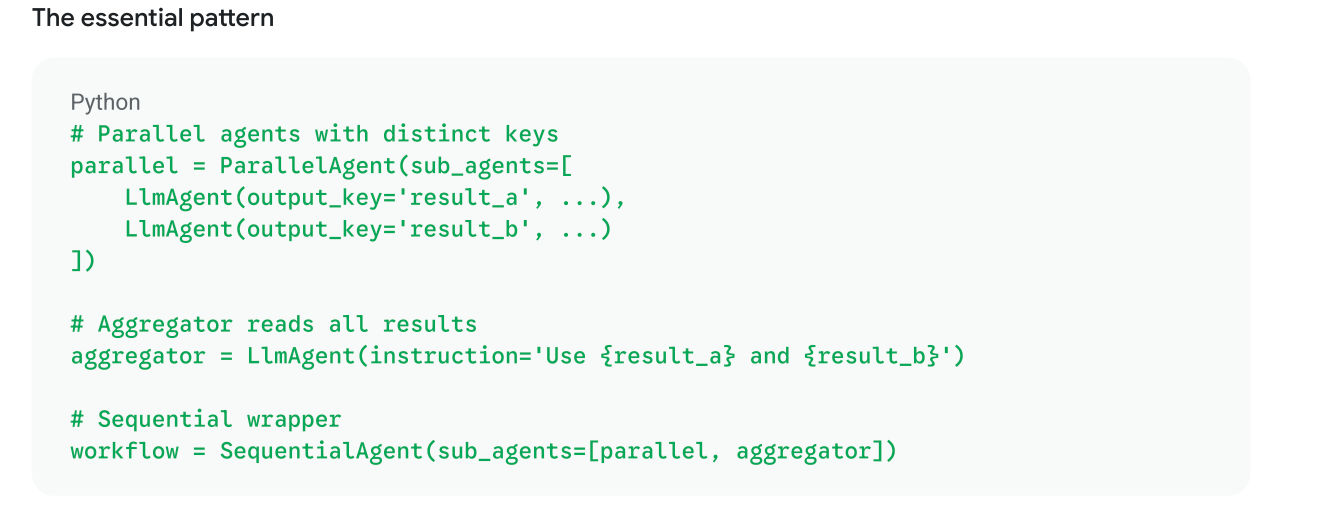
The Aggregator Pattern
You aggregate the output from multiple paralell agents using a single sequential agent to combine the results.
Each paralell agent needs to have it's own output key.
The aggregator which is the sequential agent, reads all results using their {output_key}.
State Flow
Agents in a single workflow share session state. They each write to output_key and read from it using templating.
Linear Sequential State Flow

Parallel Fan-Out

Loop/Refinement Accumulating

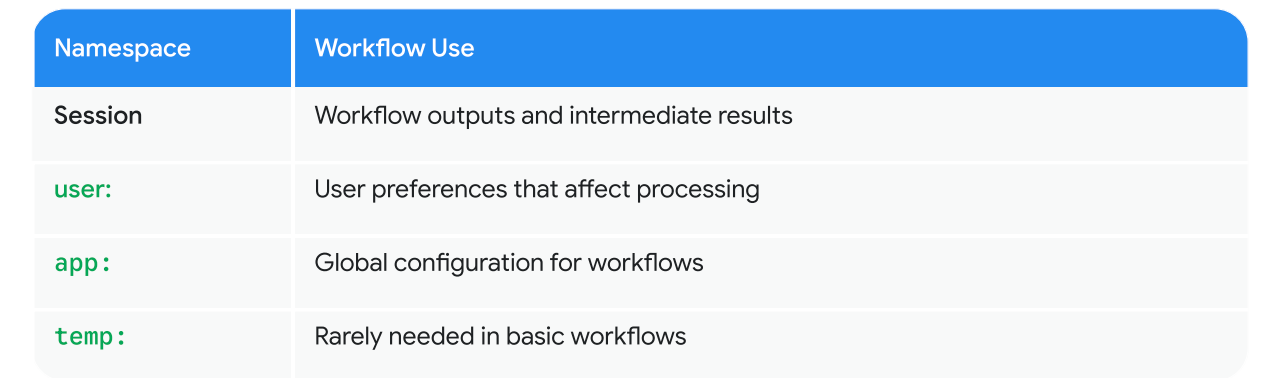
Namespaces in Workflows
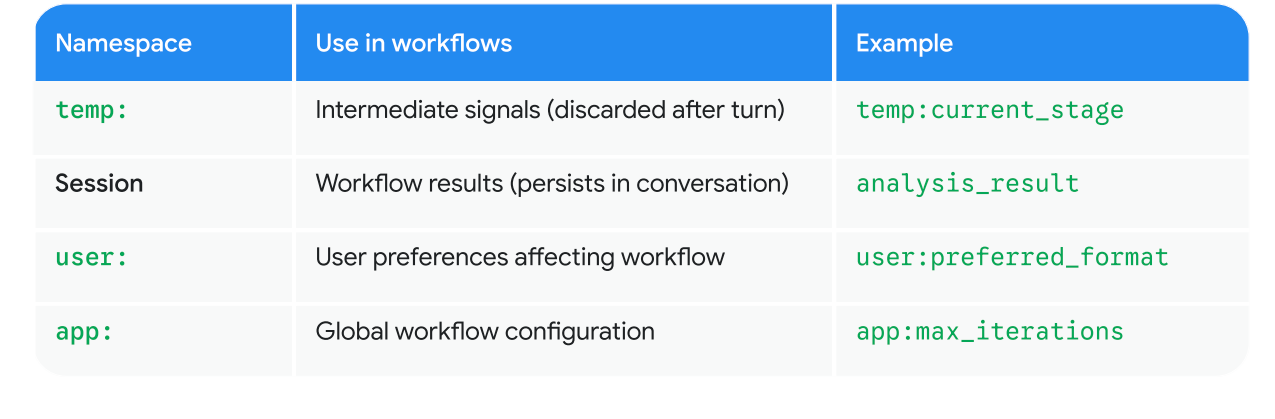
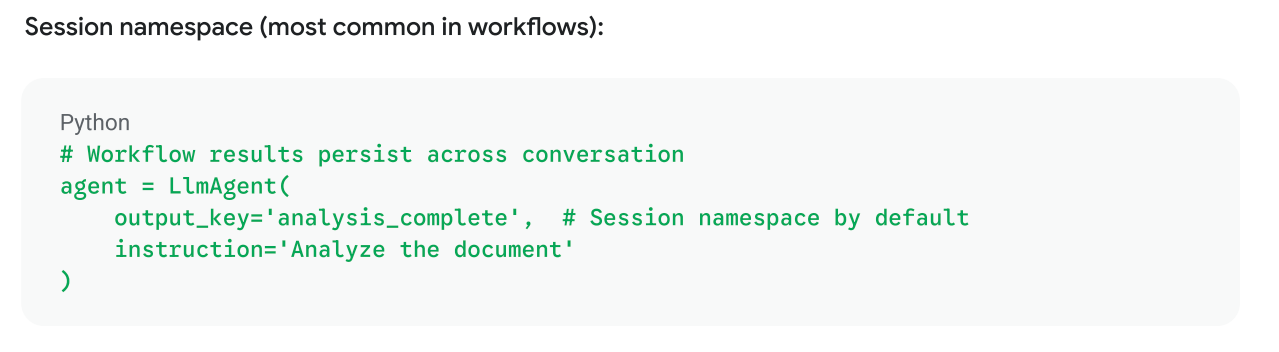
Session Namespace
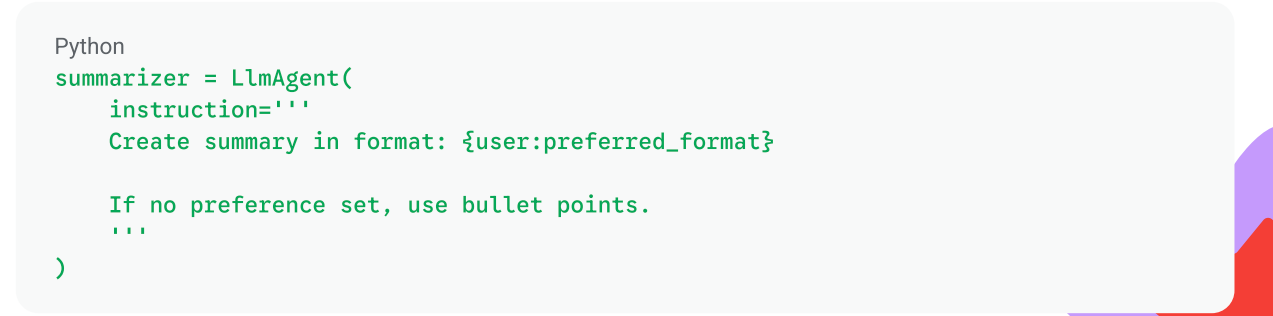
User Preferences in Workflows
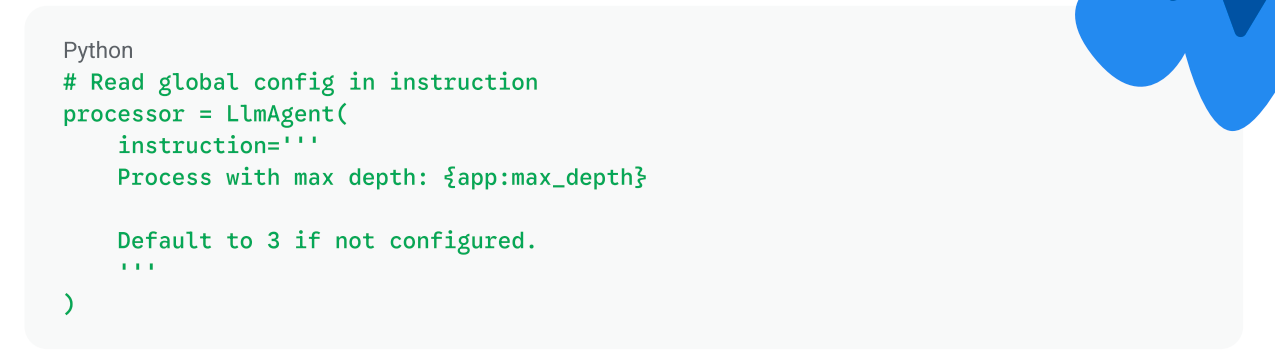
App Configuration
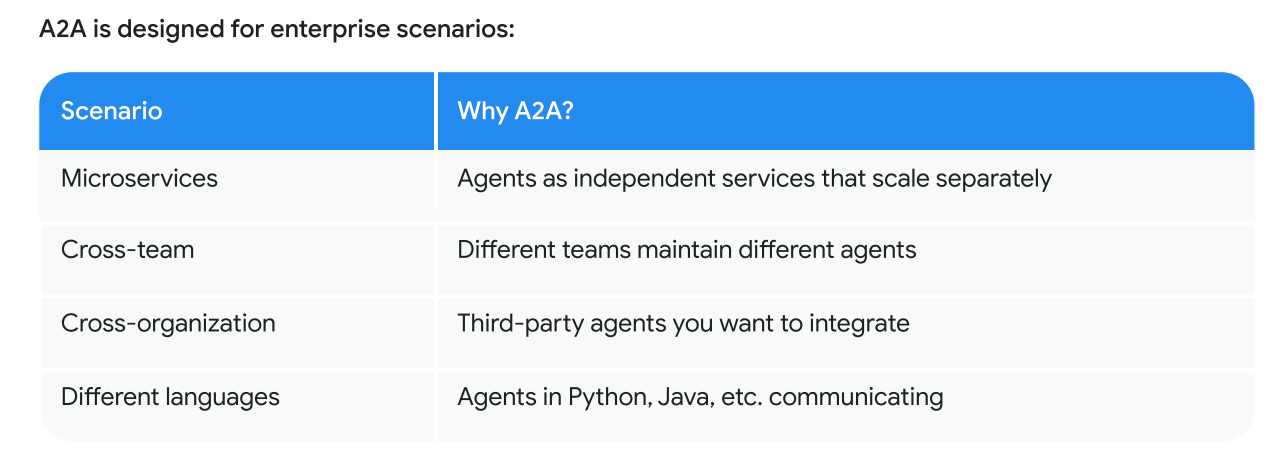
A2A Protocol
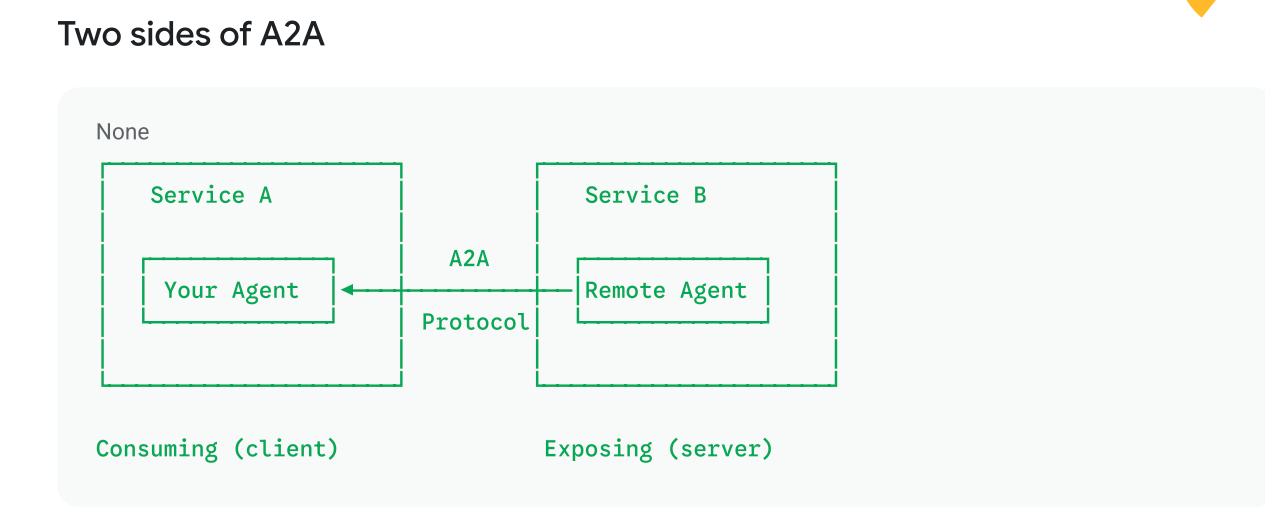
The Agent2Agent protocol - an open standard for agents to communicate across network boundaries.
- Make agents available as a network service
- Call remote agents like they were local
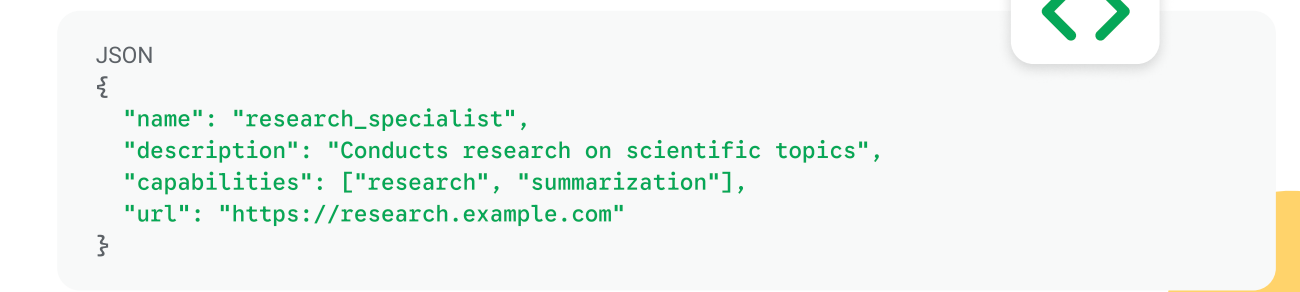
- An agent card - a contract describing what the agent does
Client-Server A2A
Agent Card
Every A2A agent has an agent card - a JSON file describing its capabilities:
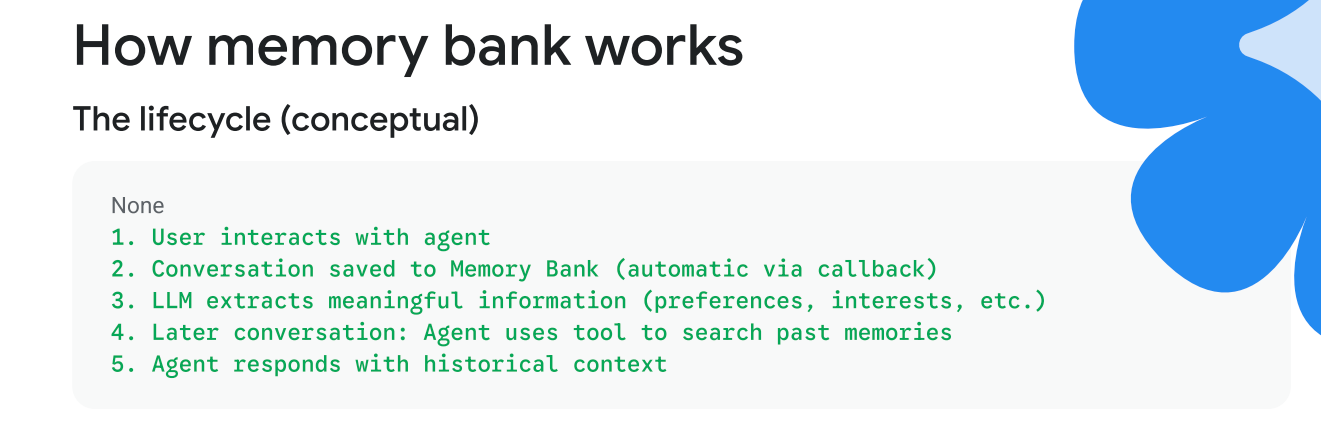
Memory Banks
Allow state to be persisted across sessions. Semantic search access via tools only, not template variables.
- Session State - this conversation
- Memory Banks - all conversations, cross session learning
Use cases:
- Customer service agents to remember past issues
- Personal assistants that remember preferences
- Learning systems that remember what the user has learnt
- Personalization - remember the user's interests