Infinispan and Caching Notes

Here's some notes I took a long time ago whilst studying Infinispan, an open-source, in-memory data grid and distributed key-value NoSQL database developed by Red Hat.

Infinispan is a distributed key-value db and cache.
- Use as a cache infront of a db
- Session management, alternative to Redis/postgres
- NoSQL data store
- Adding clustering and HA
At its core Infinispan exposes a Cache interface which extends
java.util.Map It is also optionally is backed by a peer-to-peer network
architecture to distribute data efficiently across a cluster of servers.

In addition to its core Java API, Infinispan can also be consumed by
non-JVM platforms by making use of the Hot Rod protocol, for which client
libraries for various platforms exist.
Infinispan Server
docker run -p 11222:11222 -e USER=infinispan -e PASS=secret quay.io/infinispan/server
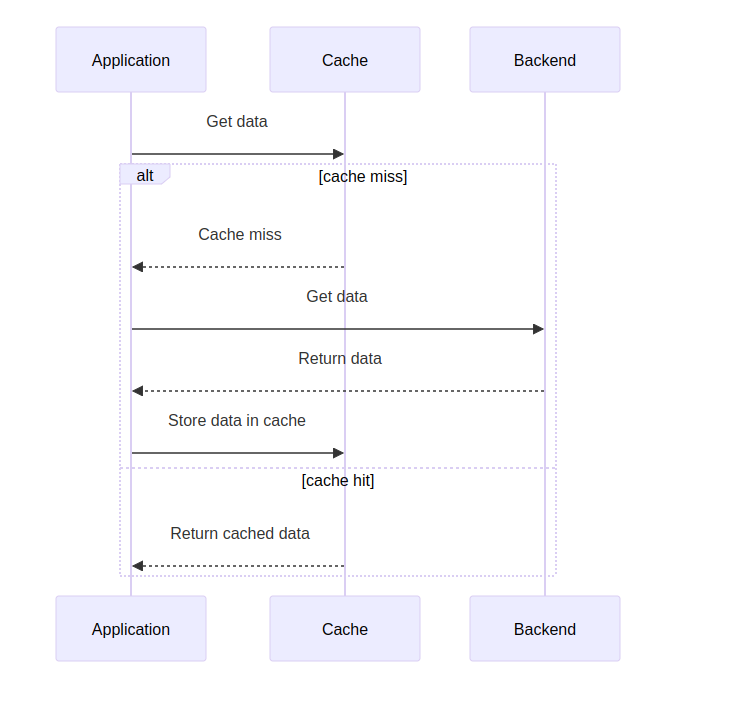
Side Caching vs. Inline Caching
Side Caching
Inline Caching
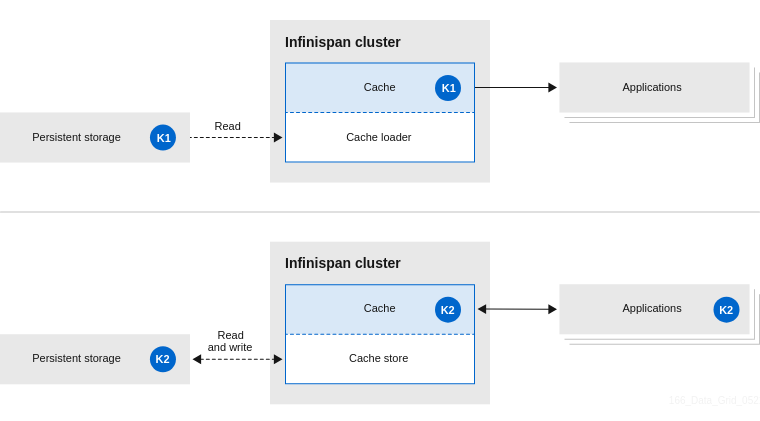
The difference between side caching and inline caching is that with a side cache, it's the application that decides how and when the entry is added to the Infinispan cluster from persistent storage. With an inline cache, all requests go through the Infinispan cluster - the application doesn't go directly to persistent storage with inline clustering.
V1 Without Caching
// assumes that var client = HttpClient.newHttpClient();
public String getWidget(String key) {
    var uri = URI.create("http://backend/widgets/" + key);
    var request = HttpRequest.newBuilder().uri(uri).build();
    return client.send(request, BodyHandlers.ofString());
}
V2 With Caching
// init the cache
RemoteCacheManager cacheManager = new RemoteCacheManager("hotrod://infinispan:secret@localhost:11222");
var cache = cacheManager.administration().getOrCreateCache("widget-cache", new StringConfiguration("\"distributed-cache\":{}}"));
...
...
...
// use Cache.computeIfAbsent()
public String getWidget(String key) {
    return cache.computeIfAbsent(key, k -> {
        var uri = URI.create("http://backend/widgets/" + k);
        var request = HttpRequest.newBuilder().uri(uri).build();
        return client.send(request, BodyHandlers.ofString());
    }, 1, TimeUnit.HOUR);
}
Embedding Infinispan Caches
See: https://infinispan.org/docs/stable/titles/embedding/embedding.html
-
Use the EmbeddedCacheManager API.
-
GlobalConfigurationBuilder API - controls the cache manager
-
ConfigurationBuilder - API that configured caches
Cluster Transport
Various transport options available for clustering including kubernetes specific. k8s transport uses DNS_PING protocol to perform service discovery using DNS records.
See: https://infinispan.org/docs/stable/titles/embedding/embedding.html#cluster-transport
In GCP, UDP multicast is not available.
Executing Code Directly on an Infinispan Cluster
See: https://infinispan.org/docs/stable/titles/embedding/embedding.html#cluster-executor
Execute functional code on your Infinispan cluster by using a Cluster Executor which you get from the EmbeddedCacheManager - you can do this in both clustered and non-clustered configurations.
When you submit the function, you get back a CompleteableFuture on which you can pass a function using whenComplete( ()-> )
See the example for approximating Pi from the above link on the cluster-executor to see how an atomic is being used to accumulate a result.
Cache Modes
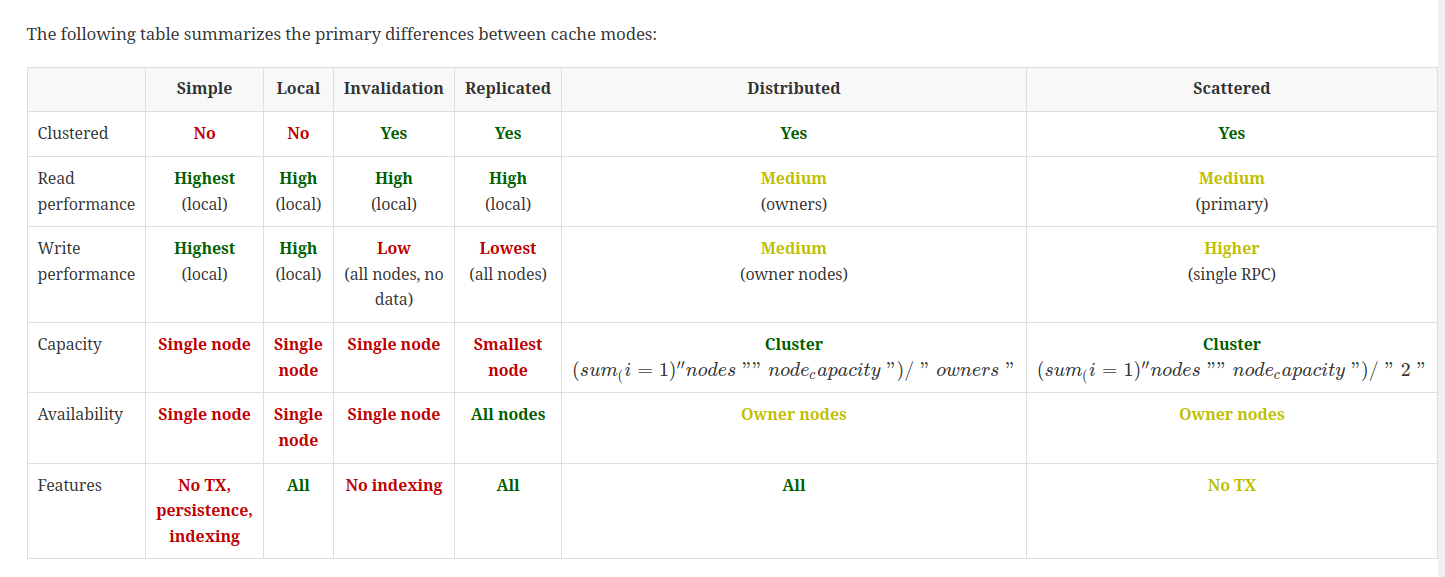
See: https://infinispan.org/docs/stable/titles/configuring/configuring.html
Invalidation Caches
Invalidation cache mode in Infinispan is designed to optimize systems that
perform high volumes of read operations to a shared permanent data store.
You can use invalidation mode to reduce the number of database writes when
state changes occur.
Scattered Caches
A scattered cache is similar to a distributed cache, except that primary
ownership is determined not by consistent hash, but by which node
originates access to a given cache entry. This has a potential use case in
EAP for distributed web sessions, since load balancer failover tends to
direct traffic to a non-primary owner (or even backup) node. This has
potential of reducing contention and improving performance following a
cluster topology change.
See: https://docs.wildfly.org/wildfly-proposals/clustering/infinispan/WFLY-9664_Scattered_Cache.html
Distributed Cache vs Replicated Cache
In a replicated cache all nodes in a cluster hold all keys i.e. if a key
exists on one node, it will also exist on all other nodes. In a distributed
cache, a number of copies are maintained to provide redundancy and fault
tolerance, however this is typically far fewer than the number of nodes in
the cluster.
See: https://infinispan.org/docs/stable/titles/overview/overview.html
Infinispan REST API - Not for embedded mode
See: https://infinispan.org/docs/stable/titles/rest/rest.html
Red Hat Data Grid Documentation
Red Hat JBoss Data Grid is based on Infinispan, the open source community
version of the data grid software. Infinispan uses code, designs, and ideas
from JBoss Cache, which have been tried, tested, and proved in high stress
environments.
Infinispan Design
https://github.com/infinispan/infinispan-designs/tree/main
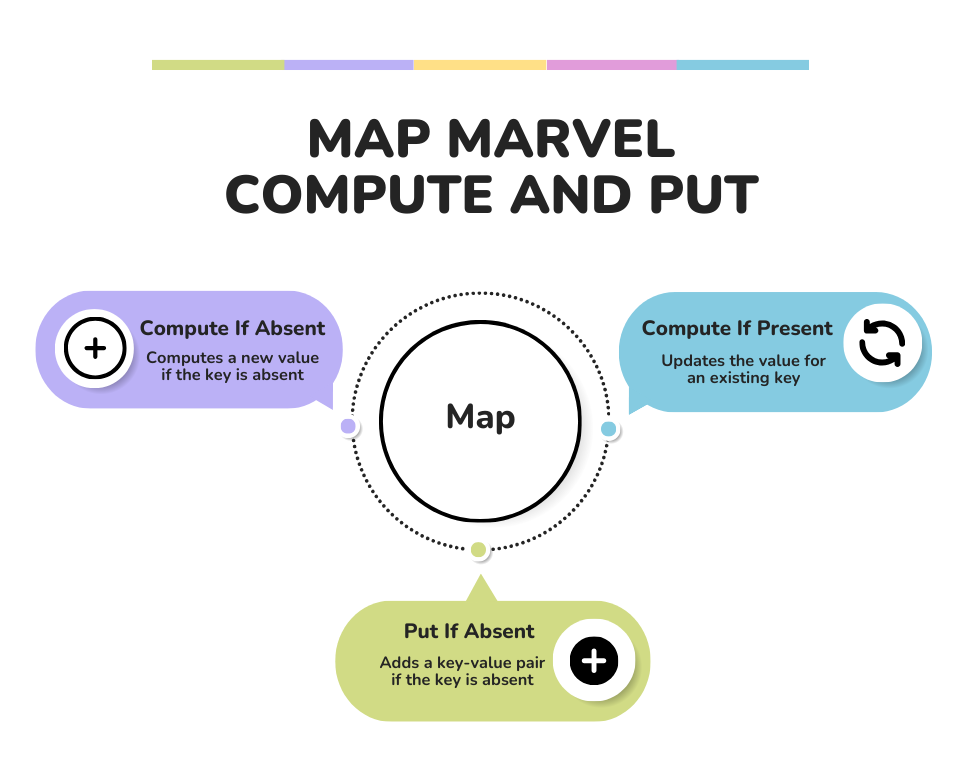
Compute.*
Code Structure
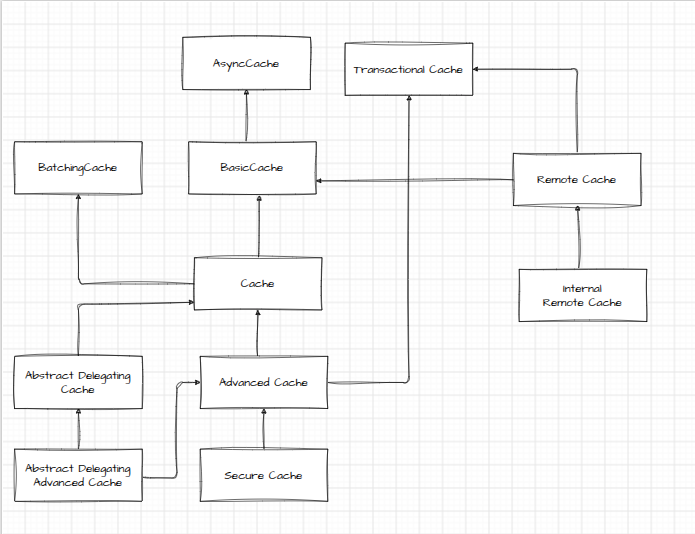
BasicCache - map interfaces + continuous queries, implements AsyncCache
ContinuousQuery - add and remove listeners on the cache
RemoteCache - uses hotrod binary protocol
Cache Managers
The CacheManager API is the entrypoint for interacting with Infinispan. Control:
- Cache lifecycle
- Creating, modifying, deleting cache instances
- Cluster management
- Cluster monitoring
- Code execution across cluster
EmbeddedCacheManager - for embedded caches
RemoteCacheManager - uses TCP/HotRod protocol to communicate to an Infinispan server in it's own JVM
Replicated Caches
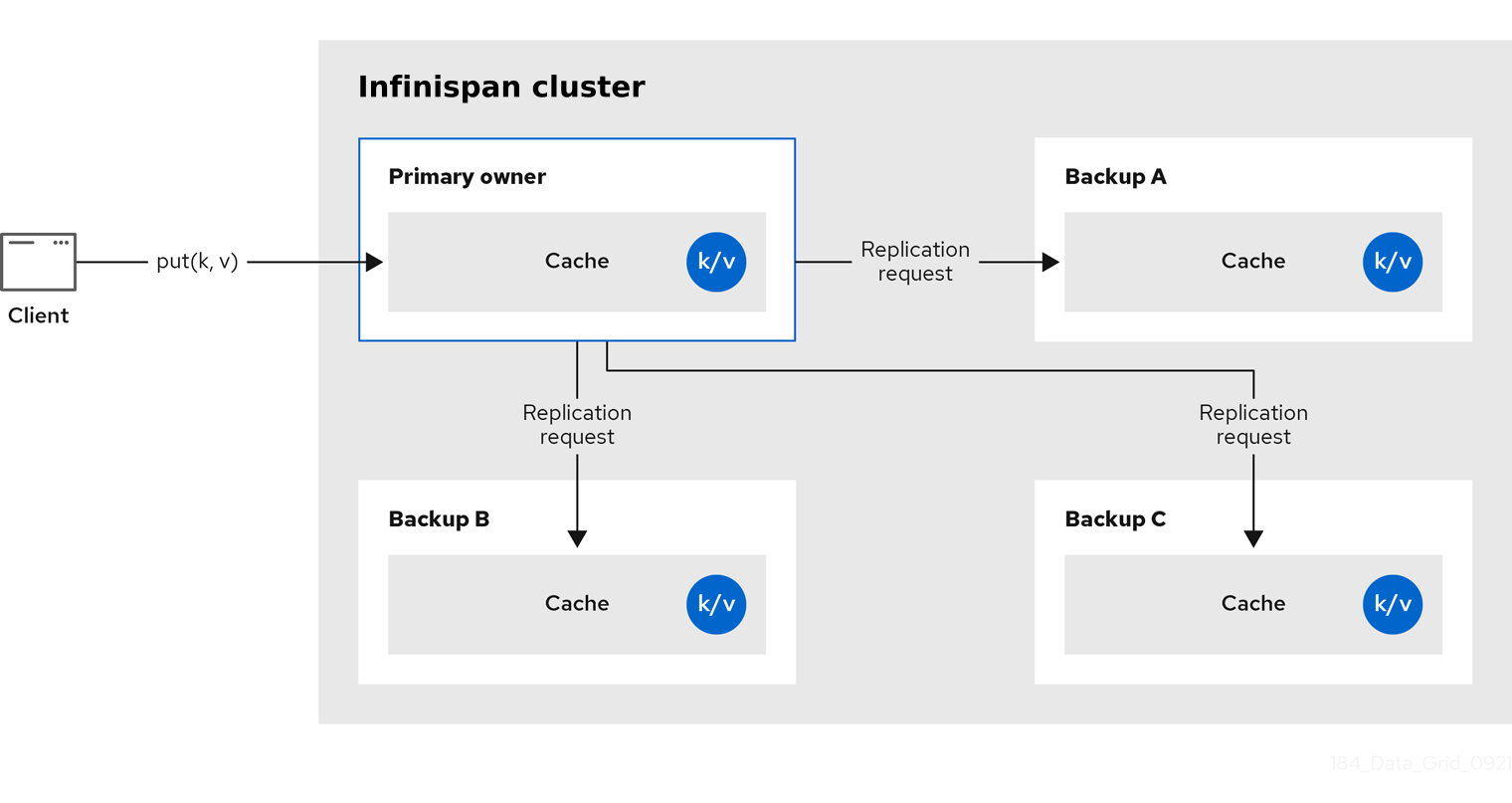
Replication means nodes can perform reads locally.
In a large cluster you end up sending a lot of replication request messages. Depending on your deployment environment you can use UDP for replication.
Each key in a replicated cache has a primary owner - it provides consistency by serializing data container updates.
Synchronous replication blocks on a put.
With async replication, communication errors or remote node errors are not reported to the caller.
Transactions and Locking
If transactions are enabled, write ops are not replicated through the primary owner.
Pessimistic locking - a write triggers a lock message broadcast to all nodes. During a transaction commit() the commiter broadcasts a one-phase prepare message and an optional unlock message. These two messages are fire and forget.
Distributed Caches
Owners
Keep a fixed number of copies (numOwners) of any entry. As nodes join and leave, the amount of replicas of a piece of data will fluctuate to be more or less than this target of numOwners.
A distributed cache tolerates numOwners-1 node failures
The number of copies is a tradeoff between performance and durability - more owners means more traffic and more copies to maintain, but the lower the risk of data loss.
Primary Owner - coordinates write access to the key
Backup Owners - for backup and faster read access
If you send a request to a backup owner to do a put() it will delegate out to the primary owner which then calls the backup owner back to do the replication of the data.
Read Operations
Reads request the value from the primary owner. If we dont get a timely response, then Infinispan will request the value from the backup owners as well.
If the key is present in local cache, the read op will require 0 messages.
Write Operations
One message from the originator to the primary owner, followed by (numOwners-1) messages from the primary owner to the (numOwners-1) backup nodes. Followed by corresponding ack messages from the backup nodes.
Transactions and Locking
Transactional distributed caches send lock/prepare/commit/unlock messages
to the affected nodes only, meaning all nodes that own at least one key
affected by the transaction
Read consistency
A read can return the value from any of the owners if the primary node does not reply quickly - therefore if the primary owner is slow, we can get the read from any of the backups, and if the replication has not been done, we can get a stale or inconsistent value.
In fact, the primary commits the update only after it receives a
confirmation from the backup. While the primary is waiting for the
confirmation message from the backup, reads from the backup will see the
new value, but reads from the primary will see the old one
Key Ownership
Distributed caches - split entries into fixed segments (256 default), with each segment being assigned to a list of owner nodes.
Replicated caches - every node is an owner
Primary owner - first node in the list of owners, other nodes are backup owners.
Segment ownership table is rebroadcast upon topology changes. This means key location without multicast/service discovery.
Key to segment mapping can not change regardless of topology changes - the segment ownership can change, but not the mapping of keys to segments.
Hashing configuration of keys is controlled by various hashing factory implementations.
Can control the relative amount of capacity for a node using capacity factors - a factor of 1 means all nodes have equal capacity, so allocate same number of segments to all nodes.
Can assign segments to nodes using a weighted capacity based on the node specifications and resources.
Zero capacity nodes - node does not hold any data
L1 Infinispan Cache
When a node retrieves entries from another node in the cluster it will create a local replica of that entry - this is an Infinispan L1 cache. You now don't need to keep looking up that entry on the primary owner.
This requires primary node owners to send invalidation messages on modified entries to remove any out of date replicas. This decreases performance of write operations as each write operation to an existing cached key results in an invalidation message.
Infinispan evicts and expires local replicas, or L1 entries, like any other
cache entry.
Key Affinity Service
You can brute force generate random keys and determine their primary owner. You can then assign that key to an application when it needs a key mapping to a specific node. e.g. facade the real key to the affined key
To do this you use the KeyAffinityService - this also keeps track of topology changes.
Grouping API
Colocate a group of entries on the same node, but you cant select the specific node.
Segment that a key belongs to is computed using the hashcode of the key. If we use the Grouping API, Infinispan will compute the segment of the group and use that as the segment of the key.
The grouping can be based on the key class (intrinsic) or generated by an external function (extrinsic)
e.g.
// Override the location by specifying a group
   // All keys in the same group end up with the same owners
   @Group
   public String getOffice() {
      return office;
   }
}
If the key is orthogonal to the grouping, or you don't have control over it, you can use a grouper function:
public class KXGrouper implements Grouper<String> {

   // The pattern requires a String key, of length 2, where the first character is
   // "k" and the second character is a digit. We take that digit, and perform
   // modular arithmetic on it to assign it to group "0" or group "1".
   private static Pattern kPattern = Pattern.compile("(^k)(<a>\\d</a>)$");

   public String computeGroup(String key, String group) {
      Matcher matcher = kPattern.matcher(key);
      if (matcher.matches()) {
         String g = Integer.parseInt(matcher.group(2)) % 2 + "";
         return g;
      } else {
         return null;
      }
   }

   public Class<String> getKeyType() {
      return String.class;
   }
}
Advanced Cache - allows for grouping
AdvancedCache has two group-specific methods:

getGroup(groupName) retrieves all keys in the cache that belong to a group.

removeGroup(groupName) removes all the keys in the cache that belong to a
group.

Both methods iterate over the entire data container and store (if present),
so they can be slow when a cache contains lots of small groups.
Invalidation Caches
Designed to optimise for high volume of read operations to a shared permanent store.
Invalidation cache mode is deprecated for Infinispan remote deployments.
Use invalidation cache mode with embedded caches that are stored in shared
cache stores only.
Invalidation mode is suitable only for shared stores where all nodes can
access the same data. Using invalidation mode without a persistent store is
impractical, as updated values need to be read from a shared store for
consistency across nodes.

Never use invalidation mode with a local, non-shared, cache store. The
invalidation message will not remove entries in the local store, and some
nodes will keep seeing the stale value.
Near Caching
When you create a RemoteCache you can pass in a configuration builder. In the config builder you pass in, you can select a nearCacheMode() and other near cache configuration.
Because near caching is a feature of a remote cache, it is dependent upon the binary protocol HotRod.
A near cache means there is application level caching - the cache which you get back from the remote cache manager will be configured for near caching. This means the application's memory space will be used to keep a copy of the data you've requested.
This is faster - less hops - but comes at the cost of memory usage.
Is there an off heap version of the near cache?
Near caches use immutable VersionedValue class to wrap the value from the cache - all fields are final, so a new object is created when and if the value changes.
How does local invalidation work with a near cache?
Is local invalidation possible? i.e. near caching with invalidation
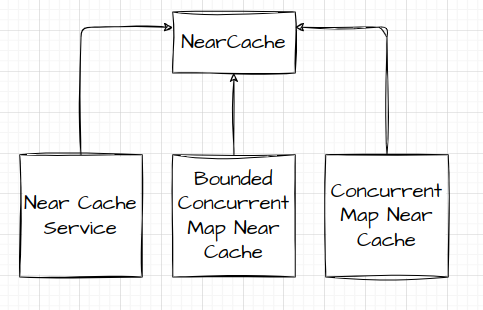
When you call getCache() on the remote cache manager, it creates an instance of a NearCacheConfiguration, the existence of which allows the remote cache manager to create a near cache service.
# Lazy Near Caches
Entries are only added to the lazy near caches when they are retrieved
remotely via get or getVersioned. If the cache entry is modified or removed
server side, the Hot Rod client receive events which in turn invalidate the
near cache entries by removing them from the near cache. This way of
keeping near cache consistent is very efficient because the events sent
back to the client only contain key information. The downside is that if a
cache entry is retrieved after it's been modified, the Hot Rod client will
have to fetch it from the remote server.

# Eager Near Caches
Eager near caches are eagerly populated as entries are created in the
server, and when entries are modified, the latest value is sent along with
the notification to the client and it stores it in the near cache. Eager
caches, same as lazy near caches, are also populated when an entry is
retrieved remotely (if not already present). The advantage of eager near
caches is that it can reduce the number of trips to the server by having
newly created entries already present in the near cache before any requests
to retrieve it have been received. Also, if modified entries are re-queried
by the client, these can be fetched directly from the near cache. The
disadvantage of eager near caching is that events received from the server
bigger in size due to the need to ship back value information, and entries
could be sent to client that will never be queried.

To limit the cost the eager near caching, created events are only received
for those entries that are created after the client has connected to the
Hot Rod servers. Existing cached entries will only be added to the near
cache if the user queries them
Configuring Near Cache Max Size - LRU
ConfigurationBuilder builder = new ConfigurationBuilder();
builder.nearCache().maxEntries(100);
Configuring Eager Near Cache Mode with Max Entries
ConfigurationBuilder eager = new ConfigurationBuilder();
eager.nearCache().mode(NearCacheMode.EAGER).maxEntries(10);
Configuring Lazy Near Cache Mode with Max Entries
ConfigurationBuilder lazy = new ConfigurationBuilder();
lazy.nearCache().mode(NearCacheMode.LAZY).maxEntries(10);
Persistance
You can configure infinispan to use persistent storage - preservation of cluster state for graceful shutdown, overflow of data from caches (gain capacity)
Write Through Mode
Synchronous. Writes data to the cache and persistent storage simultaneously.
Write Behind
Synchronous write to cache. Writes to persistent storage occur async - reduction in consistency.
Passivation
Write entries to persistent storage when the entry is evicted from memory.
Activation
Reading or writing on a key brings the key-value back into memory. This also does an async remove from persistent storage.
Preloading Caches
Populate cache on startup, warm cache - slower cluster start times
Indexing and Querying Operations
You can configure Infinispan to index cache results. This can help make continuous queries run faster. However, it increases the write latency as things now need to be indexed.
Indices are saved to disk - you can configure how long they're kept in memory before being flushed to disk.
Client listeners
It is also important to ensure that each ContinuousQueryListener you create
can quickly process all received events without blocking threads.
Client listeners provide notifications when data is added, removed or modified.
For remote caches, Infinispan Server uses an internal process to trigger
client notifications. Infinispan Server sends the event from the primary
owner node to the node where the listener is registered before sending it
to the client
Filtering Listener Events
You can provide Infinispan Server with custom filters to reduce traffic to clients. Filters allow Infinispan Server to first process events and determine whether to forward them to clients.
Data Consistency
Transactions are carried out as a single operation - either modify the cache state in a consistent way (with a history of reads and writes) or not at all.
Write Locks with Transactions
There is a configurable locking mode - the best mode depends on the level of contention on your keys.
Low contention - best mode is optimistic locking. Acquire write lock on keys before the transactions commit - higher contention means more delay on acquiring locks, as well as if there is a conflicting write then that transaction has to be rolled back and the application must retry the transaction.
High contention - best mode is pessimistic locking. Acquire write locks on keys when the application accesses them. The transaction commit is faster because you're already holding the write key.
Read Isolation
Version metadata to detect conflicting write operations.
Check for write skews to detect conflicts.
REPEATABLE_READ - requires optimistic locking
Network Partitions and Cluster Degredation
Split brain - subset of nodes become isolated from each other, intra-node commmunication becomes disjointed. The cluster becomes split into 2 - a minority partition which enters a DEGRADED mode, and a majority partition which remains available.
CAP (Consistency, Availability, and Partition tolerance) and Partition Handling Strategies
On partition, we can either have consistency or availability.
Availability - the service is available, you can read and write
Consistency - read and write operations are denied
Other options - read on cluster joins only, no writes on cluster joins.
Removing Partitions
When two parts of a cluster need to be joined back together, Infinispan uses a merge policy to decide how to handle conflicting entries.
Default behaviour is not to attempt any conflict resolution on merge which results in faster healing.
- PREFERRED_ALWAYS - majority concensus
- PREFERRED_NON_NULL - first non null value
- REMOVE_ALL - remove conflicting entries
Conflict is resolved before the merge of the nodes if there is a merge policy configured.
Continue at: https://infinispan.org/docs/stable/titles/tuning/tuning.html#off-heap-memory_deployment-planning
Ignore return values
When you’re not interested in returning value of the #put(k, v) or #remove(k) method, use Flag.IGNORE_RETURN_VALUES flag as shown below:
Using Flag.IGNORE_RETURN_VALUES Cache noPreviousValueCache = cache.getAdvancedCache().withFlags(Flag.IGNORE_RETURN_VALUES); noPreviousValueCache.put(k, v);
Persistent Storage
Cache stores and cache loaders - this is how Infinispan interacts with persistent storage.
Creates durability.
Simpler access pattern when you have Infinispan infront of a db
Can now use db for eviction and passivication
Passivation
Passivation - write entries to cache stores upon eviction.
If you do not configure eviction, then data in persistent storage provides
a copy of data in memory.
Passivation Disabled
Persistent data is a superset of that in memory. Everything stays in persisted data store.
Passivation Enabled
Store is added too upon eviction. Store is updated on entry removal. Store is updated on shutting down of the node.
Upon activation of an entry, the data is kept in the store.
When an entry is created or updated, only gets updated in memory. The store remains outdated.
purgeOnStartup - To gurantee data consistency any store that is not shared should always have purgeOnStartup enabled. This is true for both passivation enabled or disabled since a store could hold an outdated entry while down and resurrect it at a later point.
Passivation is not supported when a store is also configured as shared.
This is due to entries can become out of sync between nodes depending on
when a write is evicted versus read.
Write Through Cache Stores
Writes to memory and writes to cache stores are synchronous
The primary advantage of write-through mode is that the cache and cache
store are updated simultaneously, which ensures that the cache store is
always consistent with the cache.
Write Behind Cache Stores
Writes to memory are synchronous and writes to cache stores are async
You configure what happens when the modification queue is full or if the write to cache store fails using a fail_silently param
Segmented Cache Stores
The cache stores themselves can be segmented using hashing. Increases bulk read performance e.g. preloading a cache.
Loss of perf for bulk writes which may now need to hit multiple stores.
The number of segments you configure for cache stores must match the number
of segments you define in the Infinispan configuration with the
clustering.hash.numSegments parameter.

If you change the numSegments parameter in the configuration after you add
a segmented cache store, Infinispan cannot read data from that cache store.
Shared Cache Stores
Cache stores can be node local or shared across all nodes in the cluster.
Default is local cache stores - which should use purge on startup to avoid loading stale entries from persistent storage.
Only the primary owner of the key does writes
Global Persistent Location
GLobal state gets preserved by Infinispan so it can restore cluster topology as well as cached data after a restart
Uses file locks to control access to global persistent location.
The presence of a dangling lock file indicates that the node was not
shutdown cleanly, either because of a crash or external termination
File based cache stores
Bad on network drives - no file locking + data corruption
SQL Cache stores
SQL cache stores let you load Infinispan caches from existing database
tables. Infinispan offers two types of SQL cache store:

Table
Infinispan loads entries from a single database table.

Query
Infinispan uses SQL queries to load entries from single or multiple
database tables, including from sub-columns within those tables, and
perform insert, update, and delete operations.
Remote Cache Stores
Uses the HotRod protocol to store data on the Infinispan cluster. Remote cache containers.
Cluster Cache Loader
Retrieves data from other cluster members. Deprecated.
Infinispan Streaming
You can get a stream from the EmbeddedCacheManager and then apply stream operations too it.
e.g.
Map<Object, String> jbossValues =
cache.entrySet().stream()
     .filter(e -> e.getValue().contains("JBoss"))
     .collect(Collectors.toMap(Map.Entry::getKey, Map.Entry::getValue));
Key Filtering
filterKeys() on the CacheStream - prefer over a predicate filter
getAll() from the AdvancedCache for small payloads
Segmentation and Streams
Segment based filtering - if you're using a distributed cache. You can segment the data based on some key strategy.
Local/Invalidation
You can use streams on an invalidation cache - only data local to that node will be used.
Distributed/Replicated/Scattered
When a stream operation is performed it will send the various intermediate
and terminal operations to each node that has pertinent data. This allows
processing the intermediate values on the nodes owning the data, and only
sending the final results back to the originating nodes, improving
performance.
Under cluster membership changes:
- Iterator & spliterator - exactly once
- forEach - at least once
Issues:
- Rehash awareness, network traffic
the rehash awareness has to keep track of what keys per segment have been
processed instead of just segments.
General Streaming Approach
- Get the entries, keyset from the cache
- Get the stream associated with step 1 using .stream()
- Apply functions to the stream from step 2
- Optionally collect() the output from step 3
- Java Stream Collectors e.g. Collectors.summingDouble(...)
Continuous Queries
- Get a cache instance
- Create a
Query<T>using cache.query(...) and fill in the query - Create a continuous query instance using cache.continuousQuery()
- Create a new
ContinuousQueryListener<U,V>() - Add the ContinuousQueryListener you created in step 4 to the ContinuousQuery from step 3
You can remove the listener by calling removeContinuousQueryListener(listener) on the ContinuousQuery
TODO: When multiple nodes come online, do we get rebalancing?
Transactions and Rollback
Rolling Back Transactions
TransactionManager transactionManager = cache.getTransactionManager();
transactionManager.begin();
cache.put("key1", "value3");
cache.put("key2", "value4");
transactionManager.rollback();
Commiting Transactions
TransactionManager transactionManager = cache.getTransactionManager();
transactionManager.begin();
cache.put("key1", "value1");
cache.put("key2", "value2");
transactionManager.commit();
Cluster Memory Usage and Considerations
Data set size =

Number of entries
*
(Average key size + Average value size + Memory overhead)
Distributed data set size =

Data set size * (Number of owners + 1)
Distributed caches store copies of the KV pairs - the number of copies is equal to the number of configured owners of the data.
The reason for the +1 is that during a data rebalance, there may be a duplicate entry for any of the existing entries, therefore we need to consider the worse case situation and account for it.
The memory overhead of on-heap is approx 200 bytes and 60 bytes off heap.
It is impossible to determine a precise amount of memory overhead upfront,
however, because the overhead that Infinispan adds per entry depends on
several factors. For example, bounding the data container with eviction
results in Infinispan using additional memory to keep track of entries.
Likewise configuring expiration adds timestamps metadata to each entry.
Adjusting for Node Loss Tolerance
Loss toleration of a distributed cache: number of owners -1
Therefore, when sizing a distributed cluster you can add an additional (number of owners - 1) nodes
Data Segmentation
Infinispan strategically divides data into segments to ensure efficient
distribution of data among clusters, even during a state transfer
operation.
Data Guarantees of Replicated Caches
Each node contains all entries - more protection against data loss than distributed caches.
Distributed caches can tolerate a loss of (owners-1) nodes whereas a replicated cache can tolerate a loss of (total nodes-1)
With a distributed cache, when a node leaves rebalancing occurs which impacts performance and capacity. Upon leaving the cluster, Infinispan replicates cache entries amongst remaining cluster members to restore the configured owner count.
This results in more cluster traffic - compounding any network problem. If too many nodes leave the cluster, there may not be enough capacity to keep all data in memory.
Cluster Scaling
Replicated caches - when a node joins, it gets a copy of the dataset which takes time as nodes join. Cache size can't exceed host memory.
Distributed caches - addition of nodes increases capacity of the cluster, cache size is not limited by individual node memory capacity.
Sync or Async Replication
Primary owners send replication requests to backup nodes - this can be done async (faster, more inconsistency) or sync (slower, higher consistency).
Synchronous Replication
Infinispan notifies client upon successful replication. Infinispan responsible for retrying failed replication requests due to topology changes. Failures due to other reasons result in an exception being thrown to the client.
Async Replication
No confirmations on replication requests. Primary owner goes down whilst replication has not been actioned, backup nodes may not have a copy of the entry or have a stale entry.
When a node sends multiple requests to replicate entries, JGroups sends the
messages to the rest of the nodes in the cluster one at a time, which
results in there being only one replication request per originating node.
Infinispan uses a JGroups flow control protocol in the cluster transport
layer to handle replication requests to backup nodes
Number of Segments
Data is divided into 256 segments per cluster by default. This is to create an even distribution of data to avoid node overloading.
Managing Stale Data
Cluster wide we can set an expiration level which controls how long Infinispan keeps entries in cache.
Long expiration - higher chance of cache hit, higher chance of stale data
Short expiration - lower chance of cache hit, lower chance of stale data
Infinispan uses a thread from an existing thread pool to conduct reaping of expired data - interval between runs needs to be configured, can end up with multiple threads running at the same time if the interval is very small.
Additionally, with maximum idle expiration, you can control how Infinispan
updates timestamp metadata across clusters. Infinispan sends touch commands
to coordinate maximum idle expiration across nodes synchronously or
asynchronously.
Touch commands can be configured to be sync of async when using synchronous replication. With async, the touch commands are also async.
Cache Eviction
We have limited RAM so we can use eviction to control the amount of data kept in memory.
Can bound eviction by: max number of entries, maximum JVM mem size
Infinispan evicts entries on a per-node basis. Because not all nodes evict
the same entries you should use eviction with persistent storage to avoid
data inconsistency.
Performance is impacted when Infinispan needs to perform eviction. Eviction can slow down read operations e.g. bringing in a new cache entry causes another one to be evicted to make room due to the bounds that were set. The eviction may also involve writing the evicted to a cache store (persistent db) if passivation is enabled.
Configuring for Network Partitions
PartitionHandlingStrategy - how to handle a partition
MergePolicy - to merge partitions
To automatically detect network partitions, Infinispan uses the FD_ALL
protocol in the default JGroups stack to determine when nodes leave the
cluster abruptly.
To fix a split cluster, Infinispan merges the partitions back together.
During the merge, Infinispan uses the .equals() method for values of cache
entries to determine if any conflicts exist. To resolve any conflicts
between replicas it finds on partitions, Infinispan uses a merge policy
that you can configure.
If a write operation takes place on a node that is in a minor partition
when a split occurs, and before Infinispan detects the split, that value is
lost when Infinispan transfers state to that minor partition during the
merge.

In the event that all partitions are in the DEGRADED mode that value is not
lost because no state transfer occurs but the entry can have an
inconsistent value.
Degraded Mode
Put caches into DEGRADED mode based on the partition handling strategy
A cache is degraded if:
-
At least one segment has lost all owners
-
There is not a majority of nodes in the partition i.e. the minor side side of the partition
Under DEGRADED mode, read and writes are allowed if all replicas are on the same side of the partition. Otherwise you get an AvailabilityException if the partition doesnt contain all replicas.
With the ALLOW_READS strategy, Infinispan allows read operations on caches
in DEGRADED mode.
DEGRADED can prevent writes on keys which are in different partitions. Prevents stale reads in the same scenario of keys in other partitions.
If all partitions are DEGRADED, cache becomes available after merge if cluster contains a majority of nodes and there is a replica of each entry.
In some cases a cache in one partition can remain available while entering
DEGRADED mode in another partition. When this happens the available
partition continues cache operations as normal and Infinispan attempts to
rebalance data across those nodes. To merge the cache together Infinispan
always transfers state from the available partition to the partition in
DEGRADED mode.
Cache Encoding
Encoding is the format, identified by a media type, that Infinispan uses to
store entries (key/value pairs) in caches.
The encoding is set in the cache configuration.
Clients can set a media type and Infinispan will handle converting the data.
If the cache is not configured with a media type, it stores things as byte[] - no media type leads to issues when converting things for clients
Infinispan recommends always configuring cache encoding with the
application/x-protostream media type if you want to use multiple clients,
such as Infinispan Console or CLI, Hot Rod, or REST. ProtoStream encoding
also lets you use server-side tasks and perform indexed queries on remote
caches.
Embedded caches store entries as POJOs and for clustered mode these get serialized with the ProtoStream marshaller by default.
Text encoding
If you encode caches with text/plain you convert to and from xml, json and x-protostream
Marshalled Java Objects
Infinispan stores marshalled Java objects as byte arrays with the following
media types:

application/x-protostream

application/x-jboss-marshalling

application/x-java-serialized-object
Infinispan converts keys and values encoded with the
application/x-protostream media type to application/json
POJOs
For embedded caches. Uses media type: application/x-java-object
ProtoStream Annotation
Define the protobuf schema in Java - @Proto at the class level for all fields, vs @ProtoField for field level inclusion
See: https://infinispan.org/docs/stable/titles/encoding/encoding.html
Serialization context
This lets you register serialization details like Protobuf schemas and marshallers with Infinispan.